
Registration and Login
Welcome to the central area for our business partners. To use the digital Kaufland tools for an efficient, transparent, and future-proof collaboration, you need active access.
Are you already registered? Log in directly to access your activated tools (such as NEO, EVE).
Are you a new supplier? Start your registration process now to register your company and request access to the required systems.
FAQ
Do you have questions about login and registration? No problem! On this page we try to answer the most frequently asked questions for you.
Your Access to the Kaufland Partner Platform
As a business partner, this is where you gain central access to all relevant information for our successful collaboration. Our goal is to make our joint business relationship even simpler, more transparent, and more efficient. Security is our top priority: We ensure that all data shared on this platform is always protected and that unauthorized third parties have no access to it.
Do you not have access yet? Please contact your designated buyer at Kaufland directly. Afterwards, you will receive a registration email with all further information.
Don't have a contact person at Kaufland yet? Then please contact us at the following number: 0800 15 28 352
Registration
Why should I register with the Kaufland Partner Platform or NEO and how can I request access?
With the Kaufland Partner Platform, our suppliers get access to all data relevant for collaboration. This portal performs business processes with Kaufland even easier, more transparent and above all, more efficient. Everything has been done to ensure the shared content on this platform is secure and protected from outside access.
You do not have access yet?
Contact your responsible purchaser at Kaufland directly. You will then receive a registration email with all further information.
Don't you have a contact person at Kaufland yet?
Then call the following number: 0800 15 28 352
How does the registration work?
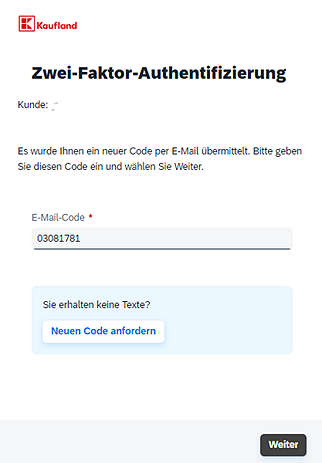
Your responsible Kaufland purchasing partner will create an account for you. You will then receive a registration e-mail. Click there on the marked link or copy and paste it in your browser.
You will then be redirected directly to the Kaufland Partner Platform registration page. For your security, the process begins with a short 2-factor authentication by mail. For this, you will receive an email with the required code for the 2-factor authentication. Add manually or copy this code into the field in your browser. Press the next button. You will now be redirected to the actual activation. Fill in all the data you need and set a password.
Please note that for your security no collective mailboxes are allowed.
The following password requirements must be met:
- between 8 and 255 characters
- upper case letter
- Lower case letter
- Numbers
- Symbols
After you have completed all the data and a password, press "Next". In the last step, please read and confirm our Terms of Use. Once all this is done, you will be redirected to the Kaufland Partner Platform and you can start directly with the processing and operations.
You can find detailed click instructions here.
I haven't received an invitation email yet or can't find it.
Refresh your inbox and wait a few minutes. If still no invitation email has been received please check your spam folder.
If you still cannot find the e-mail, you can reset your password to receive another e-mail.
You can find instructions on how to do this under "How do I reactivate my activation link?"
If you still get stuck, please contact our Business Partner support team.
Note: This invitation email is valid for 21 days!
Why does the registration page not open or display correctly?
The Kaufland applications are optimized for use with Mozilla Firefox.
Google Chrome, Microsoft Edge and Safari should also be usabel, if you are using Internet Explorer please try another browser.
The application still does not open?
Contact our Business Partner support team.
Why does the activation link sent by Kaufland not work?
Please note that the activation link is only valid for two weeks. If your activation link has already expired then click here "How do I reactivate my activation link?".
- You have already registered
If you have already used the activation link, you cannot use it again. If you have your password ready, you can log in directly via the Kaufland Partner Platform login.
If you have lost your password, click here.
- Your network security blocks access
When opening the activation link, the network security hits you. The link becomes invalid or does not forward correctly.
Try to disable the function or unblock the domains ondemand.com and kaufland.com.
- Other problems
If you haven't registered yet and the link doesn't work then click here.
If you still get stuck, please contact our Business Partner support team.
How do I reactivate my activation link?
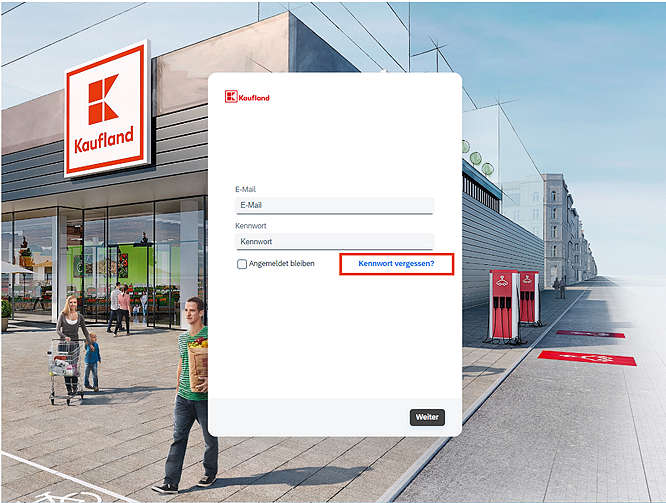
If your activation link does not work or has expired, you can reactivate it yourself.
- To do this, open the following website: Kaufland Partner Platform Login
- Now press the "Forgotten password" button
- Now enter your email address used during registration and press send.
- You will now receive an email with which you can activate your account and set a password. To do this, click on the link in the email.
Notice:
- The link to renew the password is only valid for 2 hours.
- If you do not receive the email, please check your spam folder.
You are interested in registering as a business partner on the Kaufland Partner Platform or NEO platforms, but have not yet received activation from your responsible purchaser.
Please contact your known buyer at Kaufland. Self-registration is not possible.
Don't you have a contact person at Kaufland yet? Then call the following number: 0800 15 28 352
Login
You have forgotten your password and cannot log in?
If you have forgotten your password, you can reset it from the comfort of your own home:
- To do this, open the login page of the Kaufland Partner Platform.
- Now press the "Forgotten password" button and enter the email address you use at Kaufland.
- Now press send. Within a short time you should receive an email from Kaufland, which you can use to reset your password.
Note: The link sent in the password reset email is only valid for 2 hours.
Please check your spam folder if you do not receive the e-mail.
If you still have problems with your login, please contact our Business Partner support team.
Your registration is not successful and you do not get access to the Kaufland Partner Platform or NEO?
If you have forgotten your password, please look at "I forgot my password."
If the login is still not successful, please contact our Business Partner support team.